
Railway VPN
Hakeem StudiosPersonalization
0.00.00 Reviews
- Version
- 7.6.0
- Installs
- 500.00K
- Age Rating
- Everyone
Screenshots
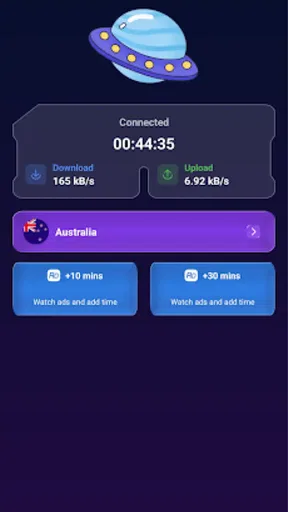
Our Review of Railway VPN
 Analysis by Appyee
I approached Railway VPN as a practical personalization app rather than assuming that its short railway-themed presentation told the whole story. Its store description is extremely brief, so the useful question is not whether the name sounds memorable, but whether this is the right kind of tool for the way you use an Android phone. In my view, it is best considered by looking at what you want from a VPN first: a simple connection experience, a privacy-focused routine, access to a familiar network while travelling, or a more complete service with clearly explained controls.
The app comes from Hakeem Studios and is free to install. It is listed for Everyone, which makes the basic audience broad, and it has passed the half-million-install mark. That level of adoption makes it worth examining, but it should not be treated as proof that it will suit every user. A VPN sits between your phone and the internet, so convenience matters, but clarity matters just as much. I would choose it because its approach fits my needs, not simply because it is free.
What I would check before choosing Railway VPN
My first decision criterion is simplicity. Many people do not want to compare technical connection settings every time they open a VPN. They want to start the app, make a connection, and return to browsing or using an app. Railway VPN is positioned as a straightforward VPN utility, so it makes the most sense for someone who values a low-effort routine over a long list of advanced options.
The second criterion is the reason for using a VPN. If your goal is to add another layer of privacy on public Wi-Fi, a lightweight app may be appealing. If you are trying to reach a particular region, protect several devices, manage a work connection, or tune performance for streaming and gaming, you need to inspect the actual controls and behavior on your own phone. A name or store summary cannot answer those questions by itself, and I would not select any VPN on branding alone.
I also pay attention to how much friction appears before and after connecting. A useful VPN should not make ordinary phone use feel like a maintenance task. I would look for an understandable connection state, a quick way to stop the service, and behavior that does not interrupt calls, messaging, downloads, or location-based apps unexpectedly. These are everyday details, but they decide whether an app remains installed after the first week.
Compatibility is another practical point. Railway VPN requires Android seven or later, so it is aimed at phones running a relatively modern version of the platform. Before installing, I would check the Android version on an older spare phone, especially if I planned to use that device as a travel handset. The current release is version 7.6.0, which is useful to know when comparing the app with older installations or deciding whether an update is available.
How I would test it during the first day
I would not judge the app from one quick connection. I would first connect on my usual home network, then disconnect and reconnect on mobile data. After each change, I would open a browser, send a message, check a map, and use the apps I normally depend on. This simple routine reveals whether the VPN fits daily use better than a speed test alone.
Next, I would repeat the test on public Wi-Fi, such as the network in a café or library. I would avoid entering sensitive information until I understood how the connection behaved. The point is not to assume that a VPN makes every activity automatically safe; it is to see whether Railway VPN gives me a stable, understandable connection when the network itself is less familiar.
A less obvious but important test is battery and notification behavior. I would leave the connection active while reading, listening to audio, and locking the screen. If the service disconnects when the phone sleeps, repeatedly asks for attention, or interferes with another connection, that may matter more to me than a polished opening screen. I would also check whether I can quickly return to normal browsing when an app refuses to work through a VPN.
Where the railway-themed app wins
The strongest case for Railway VPN is its accessibility. The free price removes the payment decision at the beginning, and the Everyone age classification makes it approachable for a household with different levels of technical confidence. I can imagine recommending it to a friend who wants to try a VPN without first committing to a subscription or learning a complicated dashboard.
Its category placement is also interesting. Railway VPN is listed under Personalization, which suggests a presentation closer to a phone-customization or themed utility experience than to a heavily documented enterprise security product. That can be a strength for users who prefer a lighter, more approachable app. It may feel less intimidating than services designed around advanced network administration.
There is a useful trade-off here: a simple VPN can be easier to remember and easier to use consistently. A complicated tool may offer more choices but end up switched off because the user does not know which setting to select. For someone whose real goal is to make VPN use part of a regular routine, a less crowded experience can be more valuable than a long menu of controls.
I also see a practical advantage for temporary use. If I were travelling and wanted to use a VPN on a secondary Android phone for ordinary browsing over unfamiliar networks, a free app with a clear connection workflow would be convenient to try. I would install it before leaving home, test it with non-sensitive tasks, and learn how to disconnect before relying on it away from my normal support options.
Everyday use: a realistic travel routine
Imagine that I am waiting at a railway station with a few minutes to spare. I connect to public Wi-Fi, open Railway VPN, and use the connection before checking messages or browsing. If the app connects without demanding constant attention, it does exactly what I need in that moment: it adds a simple step between joining an unfamiliar network and starting ordinary online activity.
The important part of that scenario is preparation. I would not install a VPN for the first time while rushing to board a train, and I would not assume that every banking, ticketing, or transport app will behave identically through it. I would test those services beforehand and keep mobile data available as a fallback. A VPN should support the journey, not become another problem to solve at the platform.
For home use, my expectations would be different. I would leave it off unless I had a clear reason to use it, because unnecessary routing can complicate troubleshooting when a website or app behaves strangely. That is one of my main tips for this kind of product: treat the VPN as a tool with a purpose, not as a switch that must remain active every minute of the day.
Where a different VPN category may fit better
Railway VPN may not be the right choice for someone who needs detailed information before trusting a connection. A privacy-focused service with extensive explanations, visible technical settings, and a clearly documented operating model may be a better fit for a user who wants to investigate every part of the service. I would choose that category when transparency and control matter more than a friendly, lightweight experience.
It may also be a poor match for a household protecting several devices. In that situation, I would compare services built around multi-device management or router-level coverage. Installing and controlling a separate app on every phone, tablet, and computer can quickly become tedious. Railway VPN is an Android app, so I would not assume that it solves a wider home-network problem.
Travelers who need a specific country or region should be especially careful. A VPN can be useful for privacy without offering the location choices someone expects for regional services. If a particular destination is the main reason for installing one, I would select a product that clearly exposes and supports that workflow rather than hoping the railway theme implies anything about server locations.
Heavy streamers and online players may also prefer a different category. Their priorities often include predictable performance, low disruption, and a quick way to change or disable routing when an app has problems. Railway VPN could still be worth testing, but I would not make it my automatic recommendation for latency-sensitive activity. For those users, the deciding factor is not the free installation; it is whether the connection remains suitable during the exact games or services they use.
There is a further distinction between a personal VPN utility and a workplace or school connection. If an organization gives you a specific VPN configuration, Railway VPN should not be treated as a replacement. I would follow the organization’s instructions and use an approved solution. A consumer app can be convenient for personal browsing, but that does not make it an enterprise access tool.
The real cost of switching
Because Railway VPN is free, the financial barrier is low, but switching still has a time cost. I would need to learn its connection flow, test the apps I use, and decide when to leave it active. That learning period is small compared with a paid commitment, yet it still matters if my phone is already stable and I do not have a clear reason to change my routine.
The biggest practical cost is troubleshooting. When a website loads slowly or an app reports a network error, I need to remember that the VPN may be involved. My preferred workflow is to compare the same task with the VPN connected and disconnected, then decide whether the extra privacy layer is worth the inconvenience for that task. This two-step check prevents me from blaming the phone, the Wi-Fi network, or the app without testing the simplest explanation.
I would also prepare a fallback before travelling. Saving important tickets for offline access, keeping mobile data available, and knowing how to disconnect are small measures that make a free VPN much less stressful to use. The hidden trade-off is that convenience comes from preparation, not just installation. A user who expects the app to solve every network problem automatically may become frustrated quickly.
Another switching cost is habit. If I move from a familiar VPN with established settings, I may lose the routines that made it comfortable, even if Railway VPN is easier in other ways. Conversely, someone moving away from a complicated service may find the simpler workflow refreshing. The right choice depends on whether I am trying to gain control, reduce clutter, avoid a subscription, or simply add a temporary privacy step.
Who should try it, and who should skip it?
I would recommend trying Railway VPN to an Android user who wants a free, approachable VPN experiment and does not need a large collection of clearly specified advanced features. It is particularly suitable for someone who uses public Wi-Fi occasionally, prefers simple phone tools, and is willing to test important apps before depending on the connection.
I would be more cautious about recommending it to a user with strict privacy requirements, business access needs, multi-device coverage, or a strong dependence on regional content. Those needs call for careful comparison with more specialized VPN categories. The free price is attractive, but it should not outweigh the importance of documentation, control, compatibility, or support in a high-stakes situation.
Parents may appreciate the Everyone classification, but I would still explain what a VPN does before handing the phone to a child. The age label makes the app broadly suitable from a content perspective; it does not replace sensible supervision or teach someone how to recognize unsafe websites, suspicious downloads, or misleading connection prompts.
My recommendation after weighing the trade-offs
Railway VPN is worth a controlled trial if you want an uncomplicated Android VPN and the free entry point matters to you. I like the idea of a tool that can be tested without turning the decision into a subscription commitment, and its broad age classification and established install base make it approachable for ordinary users. The railway identity gives it a distinct personality, but the useful decision is still about your network habits.
I would install it, test it on home Wi-Fi and mobile data, try the apps I use most, and learn the disconnect routine before using it while travelling. I would keep a fallback connection available and avoid assuming that privacy, speed, regional access, and workplace security are all the same problem. The best reason to choose Railway VPN is a simple personal workflow, not the promise of a universal network solution.
Hakeem Studios has released a current version 7.6.0 app that is available free on Android seven and later. For my needs, that makes it a reasonable option for casual VPN use and experimentation. I would skip it when I needed specialized controls or organization-grade access, but for a friend who wants to try a straightforward VPN without paying first, I would say: test it carefully, keep your expectations realistic, and decide based on how it behaves in your own daily routine.
Verdict
Strengths of Railway VPN
- Simple interface makes connecting to a VPN quick and beginner-friendly.
- Useful server selection helps users choose a preferred virtual location.
- Encrypted connections add protection on public Wi-Fi networks.
- Can help access websites affected by local network restrictions.
- Lightweight design should have limited impact on device storage.
Limitations of Railway VPN
- Connection speeds may vary depending on server distance and congestion.
- The free plan may include limits, ads, or fewer available server locations.
- VPN use can increase battery consumption during extended sessions.
- Some streaming platforms may still detect and block its VPN servers.
- The privacy policy should be checked carefully before entering sensitive data.
Similar Picks in This Category
View All
Microsoft SwiftKey AI Keyboard
SwiftKey4.3

Wallpapers
Google LLC4.1

Zedge™ Wallpapers & Ringtones
Zedge4.7

Yandex Browser with Alice AI
Direct Cursus Computer Systems Trading LLC4.3

Ringtone Maker:create ringtone
Big Bang Inc.4.7

Fonts Keyboard
Fonts Keyboard3.9
Frequently Asked Questions
What is Railway VPN and how does it work?
Railway VPN is a virtual private network application designed to route your internet traffic through a protected connection. After choosing a server and activating the VPN, the app can help mask your IP address and encrypt data traveling between your device and the VPN server. Its effectiveness may vary depending on the server, network conditions, and the websites or services you access.
Is Railway VPN free to use, or does it require a subscription?
Railway VPN may offer free access alongside optional paid features, depending on the version available in your region and the current terms shown in the app store. Before connecting, check the subscription details, advertisements, server restrictions, trial conditions, and renewal price. If a free trial is offered, confirm how cancellation works so you are not charged unexpectedly.
Does Railway VPN keep logs of my online activity?
The app’s privacy policy is the most reliable source for understanding what Railway VPN collects and retains. VPN services can process connection information, device identifiers, diagnostics, or usage data even when they do not record browsing history. I recommend reading the latest policy before installation, especially if privacy is your main reason for using the application, and checking whether data may be shared with service providers.
Can Railway VPN unblock streaming services, websites, or restricted content?
Railway VPN may allow access to content that is unavailable on a local network by connecting through servers in other locations, but this is not guaranteed. Streaming platforms and websites frequently detect and block VPN addresses, while some networks restrict VPN connections altogether. Performance also depends on distance, server load, and your internet provider, so results can differ between devices and locations.
Will Railway VPN slow down my internet or drain my phone battery?
Using Railway VPN can slightly reduce connection speed because your traffic is encrypted and routed through an additional server. The impact is usually more noticeable with distant or crowded servers, although nearby connections may perform well. Keeping a VPN active can also use extra battery and mobile data. For better performance, choose a nearby server and disconnect when secure routing is no longer needed.
